GameCube controllers in Sunfluffs
19 June 2025
GC controllers are the canon control scheme for Sunfluffs. I didn't realize this until more than 5 years into development, when i plugged one in to test a new input library, and... experienced what i guess you could call gender euphoria? Like "this is how things were meant to be all along, but i just didn't know" 
they're a somewhat overlooked controller type in indie/gamedev spaces so support for them is uncommon, and i had to use a few tricks to get them working properly.
- if you have an adapter for using real GC controllers on a WiiU/Switch, it'll work perfectly here, though you'll need to check "how to get the adapter working" below to install a driver first.
- if you have an adapter/controller meant for PC use then it'll likely work fine out-of-the-box, though it might be missing rumble (check the first section below to fix it, if there's a mode toggle on your adapter) or it might have incorrect button glyphs (email me if that's the case and i'll work with you so i can patch it).
how to get the adapter working
any adapter meant for hooking up real GC controllers to a WiiU or Switch would work fine out-of-the-box, except it doesn't show up as a device on Windows at all (so the game can't see it). So you'll need to install a driver to make it show up. I'm sorry if it's a little bit intimidating!
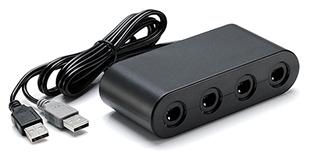
to clarify, the adapters look like this. There's official Nintendo ones and a bunch of offbrands which should all work.
instructions
(instructions taken from the Dolphin wiki, which uses the same setup. Thanks!)
Windows
- some adapters have a button on the back to toggle between PC mode and WiiU/Switch mode — set it to WiiU/Switch mode. (PC mode works without needing to do any of this, but tends to be glitchy and won't have rumble.)
- plug it in if you haven't already. Only the black plug is technically needed, but if you want rumble then you should plug in the gray one too.
- download and launch Zadig, a small program to modify device drivers. (Download the exe file under "Assets" in the latest release.)
- in Zadig, click "Options" and enable "List all devices".
- in the dropdown menu, select "WUP-028" (the GC adapter). Its USB ID should be listed as "057E 0337" in the boxes below.
- in the right column (with the green arrow pointing to it), select "WinUSB". Then click "Replace Driver".
- boot up Sunfluffs and it should work now!
Linux
- some adapters have a button on the back to toggle between PC mode and WiiU/Switch mode — set it to WiiU/Switch mode. (PC mode works without needing to do any of this, but tends to be glitchy and won't have rumble.)
- with root privileges, navigate to the location "/etc/udev/rules.d/" (or "/lib/udev/rules.d/" if making a package) and locate the file "51-gcadapter.rules" (if the file does not already exist, then create a new empty file with that file name).
- open that file and paste the following into it:
SUBSYSTEM=="usb", ENV{DEVTYPE}=="usb_device", ATTRS{idVendor}=="057e", ATTRS{idProduct}=="0337", TAG+="uaccess" - save and overwrite the existing file, then either restart your PC or reload udev rules with the following terminal command:
sudo udevadm control --reload-rules - if you did not restart your PC, then also re-insert the adapter.
- boot up Sunfluffs and it should work now!
for some technical details: after doing this, it still doesn't read as an "actual controller" as far as Windows is concerned, it's just an arbitrary USB device. Not many games support them directly like this, with the most notable being Dolphin. It's real cute that i got to do this though, my code is receiving the exact same raw signals that a real GameCube would! So for a few days i got to pretend i'm a professional developer living in 2002. 
me rambling about how good the controller is
okay so, something that's been bugging me for 15+ years but i never realized how to put it into words until recently: regular game controllers have different layouts depending on if you're in gameplay or in menus. Check out the standard Xbox layout:
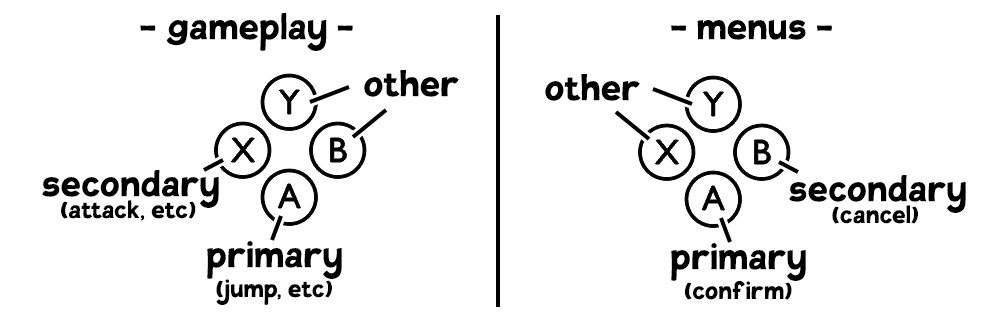
in both cases the primary action is on A, but the secondary action is different! It's on X in gameplay but B in menus.
the SNES/Switch layout is even more bizarre:
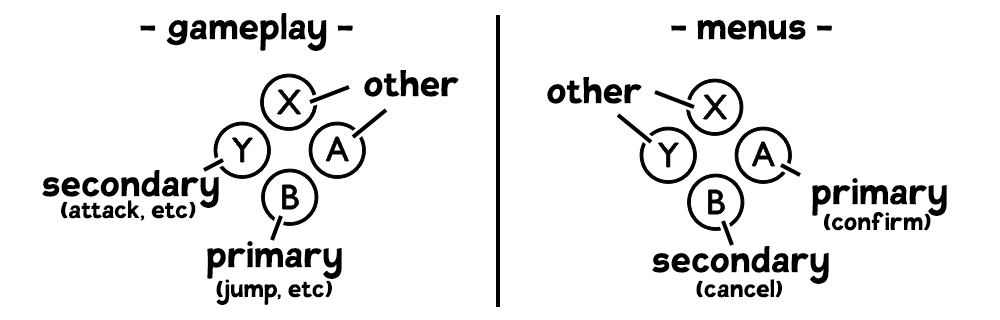
now even the primary button is different! In some ways this is nice, since it means that A can be the dedicated Talk button (which is separate from jump and attack), since then once you're talking you're in Menu mode and can use A to advance the text. I still think it's a weird layout though and probably is confusing to players new to games.
BUT THEN
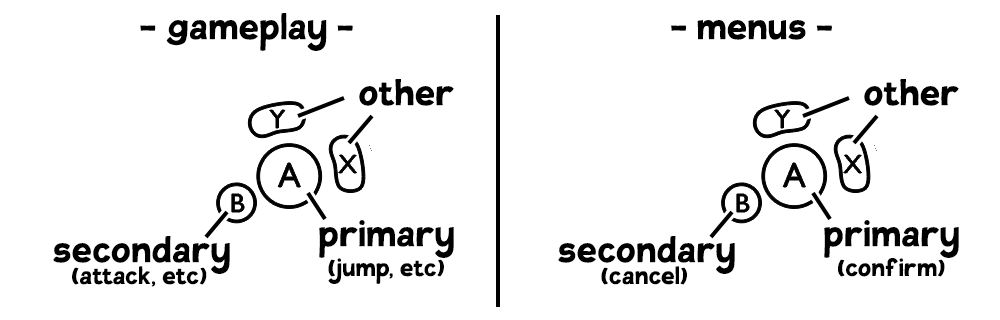
it finally lines up! In both modes, the primary action is A and the secondary action is B. This is just... good in general, and means that simple games can choose to use only those two buttons.
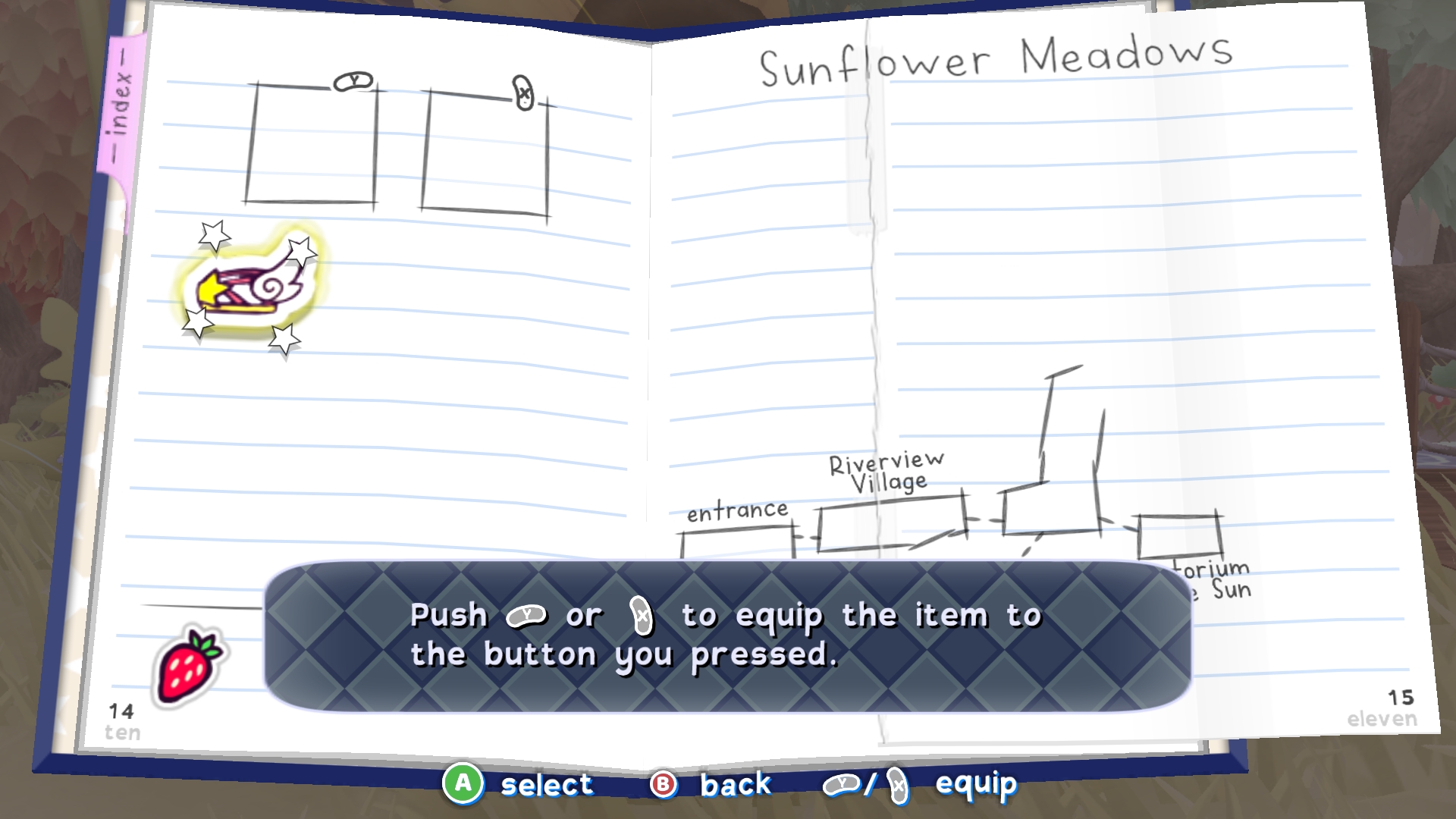
and more importantly in the case of Sunfluffs, there's two "Other" buttons that line up between modes. So equipping an item is as simple as pushing X or Y on the menu to pick what button to assign it to, and then pushing the same button during gameplay to activate it. If this was an Xbox/PS/Switch game and i was forced to conform to their button guidelines, i wouldn't be able to do that? The item controls would need to be different and it'd lack the one-to-one tactility of this beautiful system.
the N64 controller follows this philosophy too by the way, which is how Ocarina of Time was able to popularize this perfect item system to begin with! So Nintendo nailed it for two generations in a row but then reverted to the mildly inferior system afterwards. In games that use the SNES layout but want the one-to-one item buttons anyway (like Twilight Princess HD) they make the primary/secondary action buttons ingame be A and B too, but that's pretty nonstandard (and very uncomfortable IMO).
none of this is actually dependent on the physical button layout; all you'd need to do is swap B and X on the Xbox layout and all these positives would still apply. But i do like the layout of Gamecube controllers too, it's just physically pleasing to have the buttons feel different, especially when X and Y are grouped for a similar function like this. (Plus GC controllers have a really pleasing analog stick that's just fun to move around!)
if you play Sunfluffs on a controller with a regular diamond layout then the bottom button will always be Confirm and the left button will always be Cancel, so the item menu still works. It doesn't conform to the Console Button Guidelines but who cares, it's nicer this way. 
the game wasn't out yet when i first wrote this, but i figured i'd put it up ahead of time since someone wanted to know what adapter to buy. I'm honored that people care so much about getting the perfect experience here! 